



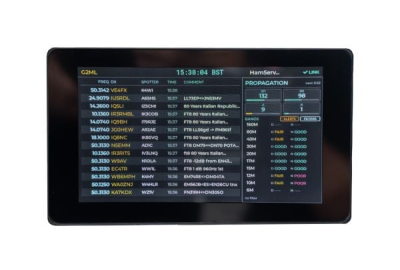
If you've ever kept a laptop running all day just so you can glance at a DX cluster window, the new TopBytes DXSpotter PRO is aimed squarely at you. It's a small, WiFi-connected display that sits on your desk and shows live DX spots, band activity and propagation information — no PC, tablet or extra monitor required. ML&S already stocks the original DXSpotter, and the new PRO model takes the same idea and puts it on a much larger, full-colour touchscreen with some genuinely useful extras.
What Is DXSpotter PRO?
At its core, DXSpotter PRO is a dedicated "radar screen" for the bands. Power it from a single USB-C cable, connect it to your WiFi network, and it links to a standard Telnet-based DX cluster — by default, the UK-hosted hamserve cluster — and starts streaming live spots straight to its display.
What sets the PRO apart is the screen: a vivid 7-inch, 800×480 colour touchscreen, bright enough to read from across the shack and large enough to show a proper list of spots rather than a single scrolling line. Each spot shows frequency, DX callsign, spotter callsign, time and any comment, and a live HamQSL propagation panel sits alongside the spot list so you can see solar and band-condition data at a glance. Tap any band, mode or callsign on the screen to filter the list on the fly — there's no need to dig through a separate configuration page for everyday adjustments.
The other headline feature is alerting. You can set up to ten callsign or prefix alerts — for a rare DXCC entity, a specific station, or anything else you're hunting — and when a match appears on the cluster, the screen flashes amber and pops up the full spot detail. No app, no laptop, and no missed contact because you happened to be looking the other way.
How Does It Compare to the Original DXSpotter?
The original DXSpotter (£59.95) remains available, and it's still a neat, low-power option if all you want is a simple scrolling spot ticker. The PRO is very much a step up rather than a replacement — both share the same underlying connection to standard DX clusters, USB power, non-volatile settings storage and OTA firmware updates, but the PRO adds a much larger display, touch control, propagation data and alerting.
| Feature | DXSpotter (Classic) | DXSpotter PRO |
|---|---|---|
| Display | 256×64 yellow OLED, scrolling text | 7-inch 800×480 colour touchscreen |
| Spot details shown | Callsign, frequency, comment | Frequency, DX call, spotter call, time, comment |
| Propagation panel | — | Live HamQSL solar & band-condition data |
| Filtering | Band/frequency filters via web portal | On-screen band, mode and callsign filtering |
| Alerts | — | Up to 10 callsign/prefix alerts with on-screen popup |
| Configuration | Web-based captive portal | On-screen wizard, plus built-in web portal |
| Power | 5V via micro USB | USB-C |
| Mounting | Desktop unit | Tripod mount on base |
| Price | £59.95 | £119.00 |
Key Features at a Glance
- Live DX cluster spots over WiFi — connects to any standard Telnet-based DX cluster, with hamserve configured by default.
- 7-inch colour touchscreen — 800×480 resolution, bright and clear from across the room.
- Built-in propagation panel — live HamQSL solar and band-condition data alongside the spot list.
- Band, mode and callsign filtering — tap to focus on the spots that matter to you.
- Up to 10 callsign/prefix alerts — amber flash and full-detail popup the moment a match appears.
- On-screen setup wizard — plus a web portal for more detailed configuration from a phone, tablet or PC.
- Settings stored in non-volatile memory — your configuration survives a power cycle.
- Over-the-air firmware updates — keeps the device current automatically.
- USB-C powered — runs from a mains adaptor, powered USB port, or a power bank.
- Tripod mount on the base — for flexible desk or portable positioning.
Where It Fits in the Shack
Because it's self-contained once configured, DXSpotter PRO works well in a few different roles. As a shack monitor, it sits next to the radio and keeps a live view of band activity without taking over your logging or SDR screen. For contest operating, it gives you a quick way to spot potential multipliers without switching windows on your main computer. For portable and field-day use, it runs happily from a USB power bank and a phone hotspot or campsite WiFi. And for newer operators, it doubles as a learning tool — watching live spots and propagation data side by side is a genuinely useful way to get a feel for how the bands behave through the day.
Setup in Minutes
- Power the DXSpotter PRO from a USB-C supply or power bank.
- Connect to its built-in WiFi access point and open the configuration page.
- Select your home or portable WiFi network and enter your details.
- Choose your preferred DX cluster and set any filters or alerts.
- Save and reboot — live spots and propagation data will appear as soon as band activity is present.
Availability
DXSpotter PRO has proved popular — the first batch sold out, and the second batch is due in late June 2026. It's available to pre-order now at £119.00, and ML&S also stocks a couple of useful extras alongside it: a MyDEL Tripod Mount (£24.95) for flexible positioning, and an Icom IC-705/IC-7100 adjustable height base mount (£54.95) if you'd like to pair it neatly with one of those radios on the desk.
View DXSpotter PRO at ML&S
Closing Thoughts
DXSpotter PRO is one of those accessories that's easy to underestimate until you've used one — a permanent, glanceable view of live band activity and propagation, sitting quietly next to the radio without eating into your screen real estate. Whether you're chasing DX, running a contest station, operating portable, or just want a more intuitive way to learn how the bands behave, the larger touchscreen, propagation panel and configurable alerts make the PRO a meaningful step up from the original DXSpotter — and at £119.00, a fairly small one to take.
Disclaimer: This post is an independent overview based on TopBytes' published product information, current at the time of writing. Specifications, pricing and availability — including batch delivery dates — are subject to change; please check the product page at ML&S for the latest stock status before ordering.
